Betaflight firmware + browser configurator
Shramko Motor Autostart
A small Betaflight 2025.12.1 module that turns a flight controller into a standalone motor driver: plug in the battery, it waits, ramps the ESC smoothly to your throttle and holds it — no transmitter, no receiver. This page connects to the board over USB, right in your browser: edit every setting, save it and watch the motor live.

- No receiver or transmitter
- Configured in the browser (Web Serial)
- DShot or PWM
- Open source · GPL-3.0
- Measured on hardware
- Ramp starts
- 10.01 s after power-on
- Ramp takes
- 10.02 s
- Max deviation from a straight ramp
- 1 µs
- Unit tests
- 42
Measured on a real HGLRC F405 8S V2 over USB with the default settings (10 s delay, 10 s ramp to 15 %). Raw data and test tools: README → Verified on hardware.
Configurator
Plug the board in by USB and press Connect. The board's settings and live data stay between your browser and the board.
The configurator needs JavaScript and Web Serial
It runs in Chrome, Edge or Opera on Windows, macOS, Linux and ChromeOS, and in Firefox 151+ (it asks once for a site permission). Android: Chrome 148+ on phones whose Android supports USB serial — try it. iPhone and iPad cannot do it: their browsers have neither Web Serial nor WebUSB.
No suitable browser? Every setting is also in the Betaflight CLI: get autostart, set autostart_throttle = 80, save. Names, ranges and defaults: settings reference.
Install the firmware
About five minutes, once per board. You need the board, a USB cable and Chrome or Edge.
Download the .hex
Open the latest release on GitHub and download the file for your board. Ready build: HGLRC F405 8S V2 (Betaflight
board_name HGLRC_F405_S8) —betaflight_2025.12.1_STM32F405_HGLRC_F405_S8_autostart.hex.Take the propeller off
Before you flash or connect anything, remove the propeller or blower wheel. With this firmware the motor starts by itself 10 seconds after a battery is plugged in.
Flash it with the Betaflight App
Open app.betaflight.com in Chrome or Edge and plug the board in by USB. Go to Firmware Flasher, press Load Firmware [Local], choose the
.hexand press Flash Firmware.Windows says “DFU device not found”?
Windows is missing the bootloader driver. Run the ImpulseRC Driver Fixer (one click), or use Zadig: pick STM32 BOOTLOADER and install WinUSB. Then flash again.
First start, then connect here
The first boot after flashing over another Betaflight resets all settings once — that is expected: this build's defaults are the project settings (DShot300, 10 s delay, 10 s ramp, 15 %). Close the Betaflight App (only one program can use the port at a time) and press Connect above.
Another Betaflight board?
Build it from source: copy the board's config.h from betaflight/config into configs/<BOARD>/, add #define USE_AUTOSTART and run the Docker build — see README → Build from source.
Versions
v1.1.0 (current): delay, ramp, throttle and its limit, run time, random gusts, battery cut-off, outputs, battery gate, button and RC switch. v1.0.0 boards connect too but show only the settings they have — update to get the rest. To go back, flash …_stock.hex from the release: the same Betaflight without the module.
How it works
The module writes the throttle where the Betaflight Motors tab writes it while disarmed, so the DShot/PWM output, ESC arming and telemetry stay stock. A 50 Hz task runs five states:
- IDLE
Wait for the battery
The board measures the battery on its
Bpin. Fromautostart_vbat_min(6.0 V) on, the battery counts as plugged in. On battery-only power that is the moment of power-on. - DELAY
Countdown
autostart_delayseconds (10). Meanwhile the ESC gets stop frames — always at least 3 s — so it arms on zero throttle. - RAMP
Ramp
A straight line from 0 to
autostart_throttle(15 %) inautostart_ramp(10.0 s). The settings are frozen when the program starts. - RUN
Steady or gusts
STEADYholds the level.GUSTSadds random sharp bursts betweenautostart_gust_minandautostart_gust_max.autostart_throttle_limitcaps every output. - DONE · LOW_BATTERY
Stop
DONEwhenautostart_run_timeis over;LOW_BATTERYwhen the battery stays below cells ×autostart_cell_cutoff(3.30 V per cell) for 5 s — then the ESC beeps every 3 s. With a run time of 0 it runs until the cut-off or power off.
What stops the program
- Entering the CLI
- The Configurator Motors tab (any
MSP_SET_MOTOR) - Arming via a receiver
- A valid receiver link (unless
autostart_boxis set) - Run time over
- Battery cut-off
- Unplugging the battery
- A button click while it runs
It never restarts by itself. In POWER mode, plugging a battery in again starts the countdown again. Every name, range and default: settings reference.
Wiring: HGLRC F405 8S V2 + Flycolor X-Cross HV3 160A (6S)
Use the 8-wire cable that comes with the flight controller (white ×4, yellow, green, black, red). Three joints, each soldered and insulated:
- ESC yellow (signal) → cable white next to the yellow (pin
1; in this build all four whites carry the same signal) - ESC black (signal ground) → cable black (
G) - A new thin wire (22–24 AWG) from battery + → cable red (
B, board power)
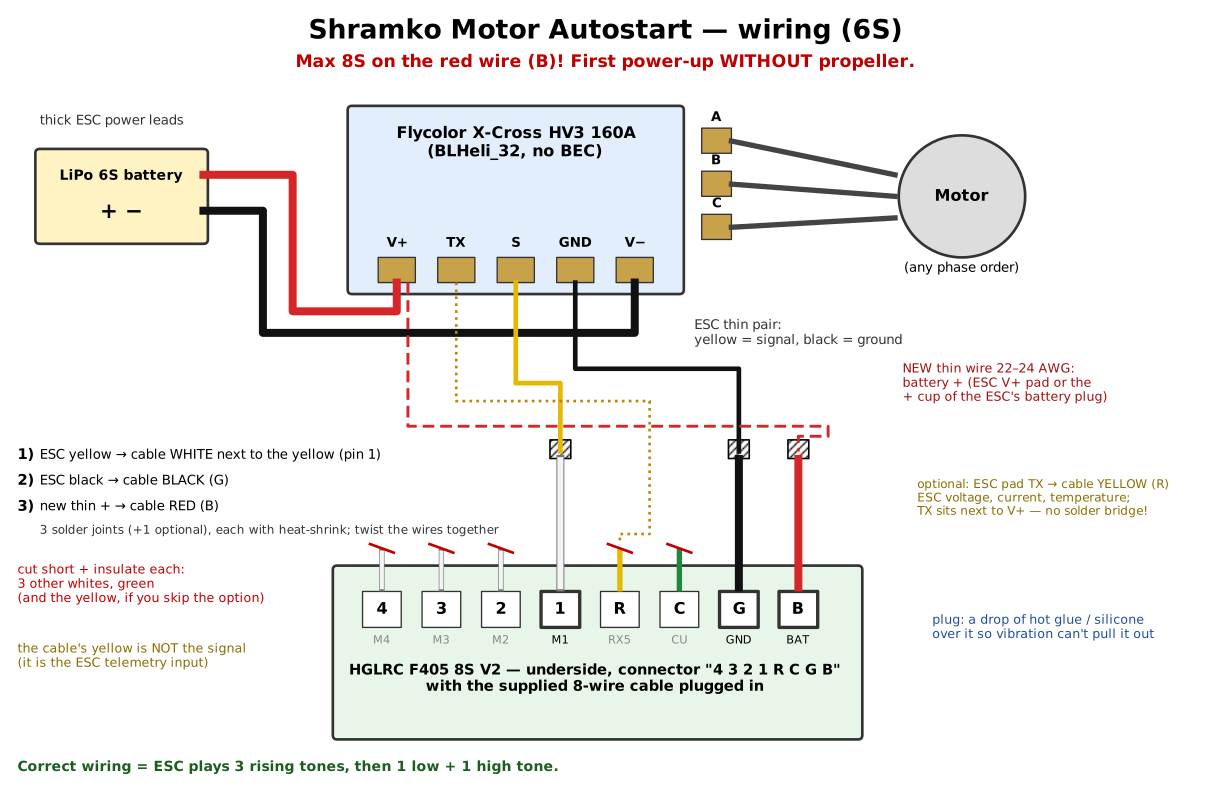
- The cable's yellow is not the signal: it is the ESC telemetry input. Cut and insulate it, the green and the other whites.
- Never more than 8S on
B. For 10–12S, feed the board from a 12S-rated BEC. - Correct wiring: on battery the ESC plays 3 rising tones, then one low and one high tone (signal seen, armed).
Which computers and phones work
The configurator talks to the board through Web Serial, a browser feature that only some browsers have.
| Device | Browser | Works? |
|---|---|---|
| Windows, macOS, Linux | Chrome, Edge, Opera | Yes |
| Windows, macOS, Linux | Firefox 151+ | Yes — asks once for a site permission (flashing firmware needs Chrome or Edge) |
| Windows, macOS, Linux | Safari, older Firefox | No — no Web Serial |
| Android phone or tablet | Chrome 148+ with a USB-OTG cable | Only on phones whose Android has USB serial support (Google: “a limited set of devices”, from 2026) — try it |
| iPhone, iPad | Any | No — iOS browsers have no Web Serial or WebUSB |
Only one program can use the board's port at a time: close the Betaflight App before connecting here, and this page before flashing.
Risks and safety — read before you plug in a battery
- The motor starts by itself. With the default settings it spins 10 s after a battery is plugged in. Propeller off on the bench; treat a powered device as live.
- Never more than 8S on the
Bpin. The red wire carries the battery voltage: if it touches a white, yellow or green wire, the flight controller's processor dies. - Ground use only. This is a motor driver, not a flight setup. Arming via a receiver hands the motors back to stock Betaflight.
- The battery cut-off protects the pack, not the wiring. It is not a fuse, and with a cut-off of 0 there is none at all.
- Some ESCs need PWM. A BLHeli_32 ESC that reports “activation failed” accepts PWM only:
set motor_pwm_protocol = PWM. - Things outside this project can change: browser support for Web Serial, the Betaflight App, ESC firmware. If something stops working, tell me via Feedback.
More: SECURITY.md · docs/warnings.md
Questions people ask
How do I spin a brushless motor without a receiver or transmitter?
Flash Shramko Motor Autostart (Betaflight 2025.12.1 with a small module) and plug in the battery: after autostart_delay (10 s) the motor ramps up over autostart_ramp (10 s) to autostart_throttle (15 %) and keeps running. No receiver, switch or computer is needed; you set the numbers once, here or in the CLI.
Can Betaflight stop the motor when the LiPo is low?
Yes, from firmware 1.1: set autostart_cells (6) and autostart_cell_cutoff (330 = 3.30 V per cell, 19.8 V on 6S). When the voltage stays below that for autostart_cutoff_time (5 s, so a short sag during a gust is ignored), the motor stops and, with DShot, beeps every 3 s. It starts again only after the battery is unplugged and plugged back in.
Does it work on Android or iPhone?
iPhone and iPad: no — no iOS browser has Web Serial or WebUSB (even Betaflight’s own iOS app connects only over Bluetooth). Android: Chrome 148+ with a USB-OTG cable, on phones whose Android supports USB serial; Google rolls this out to a limited set of devices, so just try it. On Windows, macOS and Linux use Chrome, Edge or Opera (or Firefox 151+).
Which flight controllers are supported?
A ready .hex exists for the HGLRC F405 8S V2 (HGLRC_F405_S8), tested with a Flycolor X-Cross HV3 160A (BLHeli_32) on 6S. Any other Betaflight board works after a build from source: add #define USE_AUTOSTART to the board's config.h and run the Docker build described in the README.
How do I make a slow soft start for an ESC, like 0 to 15 % over 10 seconds?
That is the ramp: autostart_ramp in tenths of a second (100 = 10.0 s, up to 600 s) and autostart_throttle in percent. The ramp is a straight line: measured on hardware, it deviates by at most 1 µs.
Can I change the settings without this website?
Yes. In the Betaflight CLI, get autostart lists them, set autostart_throttle = 80 changes one, and save stores it and reboots. Entering the CLI stops a running program, so the motor never jumps to a new value.
Is it safe to plug in the battery while the USB cable is connected?
Yes, that is how bench tests are meant to be done (propeller off): the countdown starts only when the battery appears, unplugging it for more than 0.5 s stops the motor, and the CLI or the Motors tab takes over at once. If the motor should never spin while a computer is attached, set autostart_usb_inhibit = ON.
How do I go back to normal Betaflight?
Set autostart_mode = OFF (stock behaviour, the module stays idle), or flash …_stock.hex from the release — the same Betaflight 2025.12.1 without the module — or any official Betaflight build.
For your AI agent
Using an AI agent (Claude, ChatGPT, Cursor…)? Copy this prompt: it tells the agent where the firmware, the settings reference and the safety rules are, so it can walk you through the setup.
Task: set up Shramko Motor Autostart (Betaflight 2025.12.1 firmware: the motor starts by itself on power-up, no receiver).
Repo: https://github.com/AndriiShramko/shramko-betaflight-motor-autostart - read AGENT_SETUP.md and docs/settings.md first.
1. Ask me to remove the propeller. Never let the motor spin with a propeller on.
2. Firmware: the .hex from https://github.com/AndriiShramko/shramko-betaflight-motor-autostart/releases/latest (HGLRC F405 8S V2 = HGLRC_F405_S8). Other Betaflight boards: build from source (README, Docker, #define USE_AUTOSTART in the board's config.h).
3. Flash: https://app.betaflight.com in Chrome or Edge -> Firmware Flasher -> Load Firmware [Local] -> Flash Firmware. Windows "DFU device not found": ImpulseRC Driver Fixer or Zadig (WinUSB for STM32 BOOTLOADER).
4. Configure: https://autostart.flyreelstudio.eu (Connect, edit, Save) or the Betaflight CLI: get autostart / set autostart_<name> = <value> / save. Use only the names, ranges and defaults in docs/settings.md.
5. Wiring: docs/wiring.md. Never more than 8S on pin B.
In the repo for agents: AGENT_SETUP.md · AGENTS.md · llms.txt · docs/settings.md
Who made this, and working together

Drones · 360° camera rigs for extreme shoots · 3D/4D Gaussian splatting · Bydgoszcz, Poland
I'm Andrii Shramko. I build drone and 360° camera systems for extreme shoots — storm chasing, city-scale Gaussian-splat scans — and the tools around them. This firmware drives the blower of the META4 Tornado camera case: it clears water from the 360° camera's optics as soon as the box is powered, with nobody touching it.
Open to interesting people and ready to help teams build ambitious projects — embedded and drone hardware, camera rigs, scanning pipelines, partnerships, licensing or funding.
Privacy
Controller: Andrii Shramko, Bydgoszcz, Poland — zmei116@gmail.com. The configurator talks to your flight controller directly from your browser: the board's settings and live data never reach our server.
The server stores only what you send on purpose: feedback (bug, idea) and collaboration messages, with a contact if you give one, and — only if you tick the box — technical details (page version, browser and screen, recent errors, the configurator's log). The text and the contact are also forwarded to the author's Telegram (Telegram FZ-LLC, Dubai — outside the EEA); the original stays on a server in the EU. Kept for up to 12 months and used only to reply and to fix the site.
Page counters work without cookies and without IP addresses; the server logs keep no IP addresses and no query strings. Google Analytics is loaded only after you accept it.
You can ask for a copy or deletion of your data at any time: zmei116@gmail.com.